
Next-Gen Management Console for WildFly
 By Harald Pehl
| May 12, 2026
By Harald Pehl
| May 12, 2026
We’re excited to share that we’ve been working on a next-generation management console for WildFly. At its core is HAL Foundation — a shared foundation that provides the building blocks for WildFly’s management console implementations. Built on top of HAL Foundation, halOP (HAL On Premise) is the next-gen management console and will be the successor to the existing HAL management console you know and love.
halOP is a complete rewrite, built from the ground up using modern technologies like Java 21, J2CL (Java to JavaScript transpilation), Crysknife CDI, PatternFly Java, and Elemento. The result is a fresh, modern user experience that makes managing your WildFly instances easier and more enjoyable.
The next-gen management console was also introduced at the WildFly Community Call on December 18. If you prefer a live walkthrough, you can watch the recording or browse the slides.
What’s New
The new console comes with a number of exciting features and improvements:
Dashboard
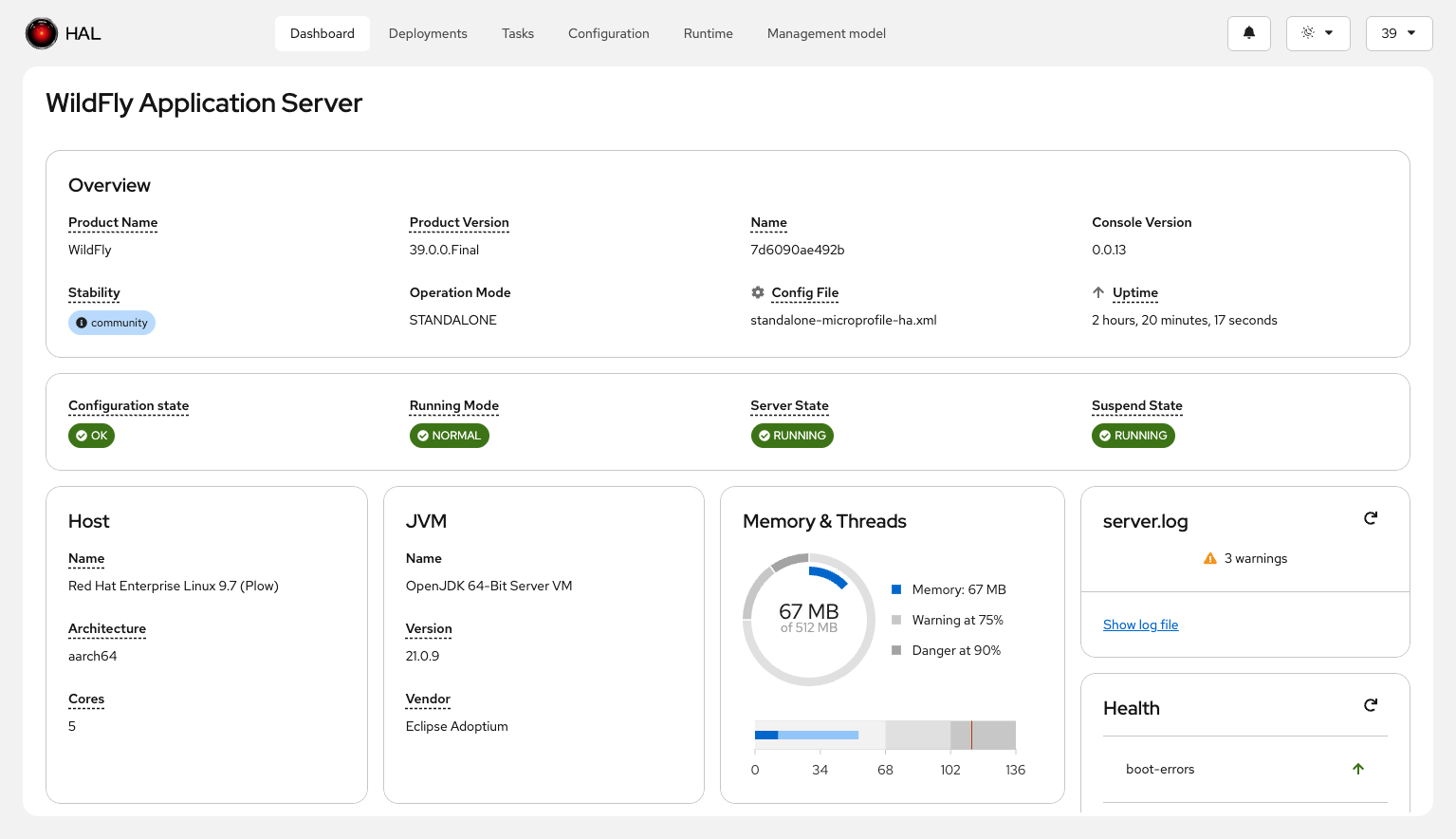
The new dashboard gives you an at-a-glance overview of your WildFly instance. It shows key information like the server status, WildFly and JVM version, management model version, and stability level — all in one place. We have lots of ideas for the dashboard and are actively looking for feedback. If you have suggestions for what you’d like to see on the dashboard, please join the discussion at #71.
Themes and Accessibility
halOP supports both light and dark themes, along with a contrast selector — making it more accessible and comfortable to use in different environments.
Stability Level Indicators
Resources, attributes, operations, and parameters now display their stability levels directly in the UI. This helps you quickly understand which features are stable, preview, or experimental.
Use Case-Centric Tasks
A brand-new top-level Tasks category lets you complete complex management tasks quickly.
Tasks combine multiple steps and operations that involve configuring different subsystems and resources.
For example, the "Statistics" task lets you manage the statistics-enabled attribute across multiple resources, with filtering and expression assignment capabilities.
We’re planning to add more tasks over time.
If you have ideas for tasks that would make your life easier, please let us know at #189.
Enhanced Model Browser
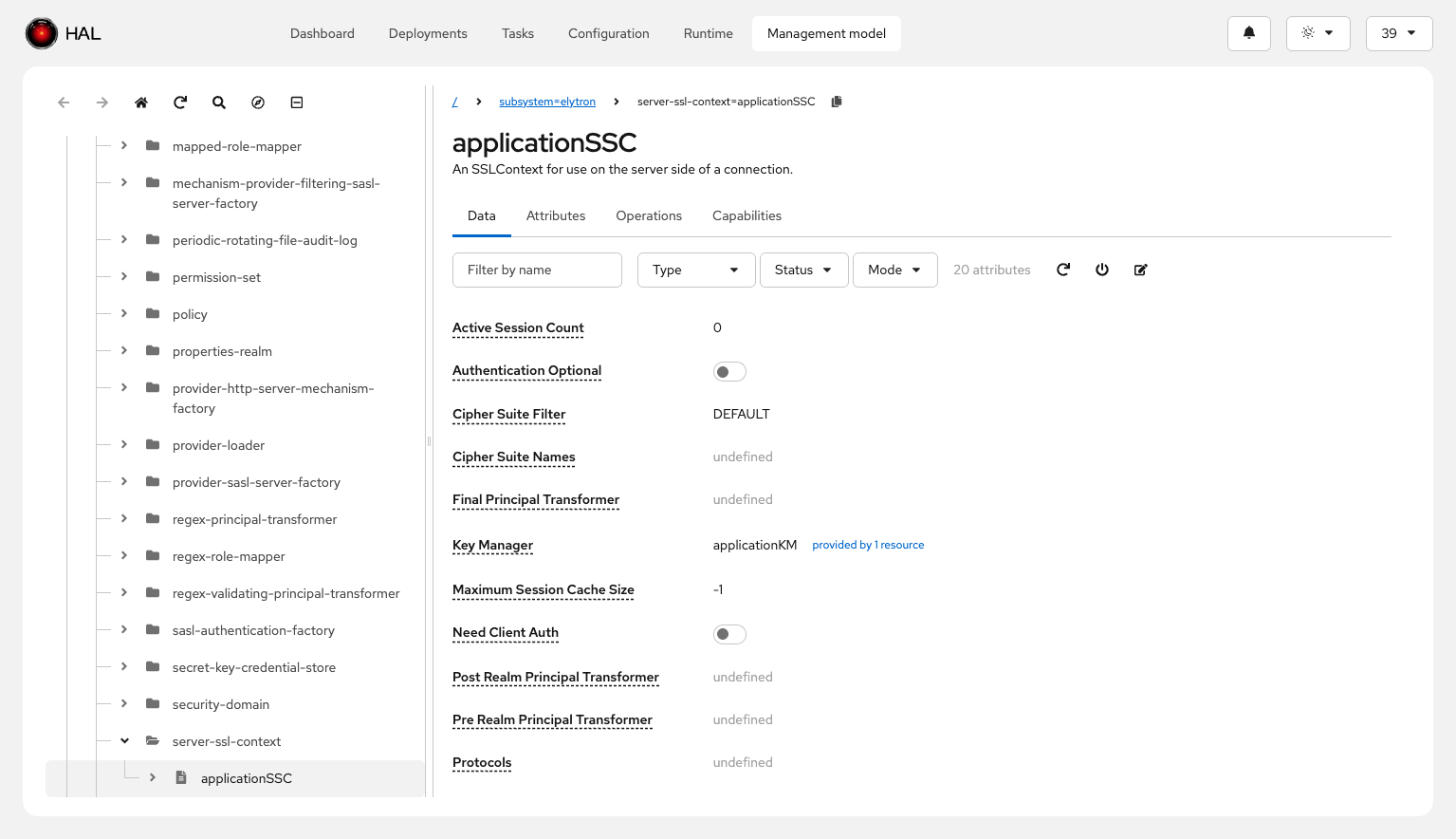
The model browser has received significant improvements:
-
Resizable tree navigation for a more flexible layout
-
Forward and backward history navigation to move between resources quickly
-
Search functionality for addresses, resource types, and names
-
Direct resource navigation via resource address input
-
Breadcrumb navigation reflecting the current address
-
Clipboard copy to copy the current resource address and paste it into the CLI
-
Capability reference following to jump between related resources
-
On-the-fly dependent resource creation to create dependent resources without losing context
Improved Attribute and Operation Management
Working with attributes and operations is now more powerful:
-
Filtering by name, status (defined/undefined, required/not required, deprecated/not deprecated), and mode (configuration/runtime, read-write/read-only/metric)
-
Attribute descriptions available as popovers
-
Capability links for referenced capabilities
-
Nested attribute support for both simple and complex types
-
Allowed values information and expression syntax highlighting
-
Operation filtering by name, signature, and deprecation status
-
Toggleable global operations display
For a full overview of all new features — including screencasts of the statistics task and on-the-fly dependent resource creation — check out the What’s New page.
What’s Already Available
halOP is already usable today! Here’s what’s ready:
-
The dashboard as the new starting page
-
The model browser with all the enhancements described above
-
Theme support (light and dark) with contrast settings
-
Stability level indicators across the UI
-
The new Tasks category with the statistics task
How to Try It Out
There are several ways to get started with halOP — pick whichever works best for you.
Bundled with WildFly
halOP can be added to WildFly using the Galleon feature-pack org.jboss.hal:hal-op-feature-pack, which is available on Maven Central.
To provision a WildFly server with halOP, use the Galleon CLI:
galleon.sh provision provision.xml \
    --dir=wildfly \
    --stability-level=experimental
Then create a management user and start the server:
cd wildfly
bin/add-user.sh -u admin -p admin --silent
bin/standalone.sh --stability=experimental
Once the server is running, halOP is available at http://localhost:9990/halop.
See the HAL Foundation README for the full provisioning details including the provision.xml configuration.
Standalone Mode
You can also run halOP as a standalone single-page application that connects to any running WildFly instance. There are multiple options:
JBang (Quickest Way)
jbang hal-op@halThat’s it — no installation required! The console will be available at http://localhost:9090.
Container
podman run -p 9090:9090 quay.io/halconsole/hal-opJVM
Download the pre-built Uber-Jar from Maven Central and run it:
java -jar hal-op-<version>-runner.jarNative Binary
Native binaries are available for Linux, macOS, and Windows — offering the fastest startup times. You can download them from the GitHub releases page, where they are attached to each release.
Get Involved
WildFly and the management console are open-source projects, and we’d love your help! Whether you want to report a bug, request a feature, or contribute code — every bit of help is welcome.
-
Browse and file issues on GitHub Issues
-
Check out the contribution guidelines to get started with development
-
Watch the HAL Foundation repository to stay up to date
We’re building this console for the WildFly community, and your input shapes what it becomes. We look forward to hearing from you!
References
-
HAL Foundation — the foundation for the next-gen management console
-
What’s New — full overview of new features with screenshots and screencasts
-
GitHub Issues — report bugs, request features, or browse open issues
-
Contributing — guidelines for contributing to the project
-
WildFly Community Call (December 2025) — live introduction and demo of the next-gen management console: recording | slides
