
halOP 0.5.0 Released — Next-Gen WildFly Management Console
 By Harald Pehl
| September 23, 2026
By Harald Pehl
| September 23, 2026
I’m happy to announce the release of halOP 0.5.0 — the latest milestone toward replacing the current WildFly management console. This release is heavy on the infrastructure that makes the console auto-generate its UI directly from WildFly’s management model. If you haven’t been following along, HAL Foundation is the shared base for both halOP (the on-premise console) and the planned halOS (OpenShift edition). It’s written in Java 21 and compiled to JavaScript via J2CL, using PatternFly Java for the UI and Elemento for type-safe DOM manipulation and routing.
Here’s what’s new in 0.5.0 and where we’re headed.
What’s New
Attribute Pipeline Overhaul
The attribute pipeline sits between WildFly’s management model and the UI. It takes raw DMR attribute descriptions and turns them into interactive view and form items — automatically. In 0.5.0, the pipeline was rewritten with a two-stage architecture: matchers claim known attribute patterns, and providers handle everything else through type-based dispatch.
New attribute types supported in this release:
-
Map attributes — full key=value editing with
map-putandmap-removeoperations -
Credential reference composites — mode-based editing that adapts to credential references
-
Time-unit composites — paired value and unit fields
-
Path attributes — paired path and relative-to fields
The pipeline now covers approximately 93% of all 5,800+ attributes across WildFly’s management model — roughly 95% of configuration attributes and 88% of runtime attributes. ResourceView and ResourceForm builders support filtering, grouping, and a grouped layout toggle for resources with many attributes.
Resource Shell & SPI
The resource shell is a composable framework for CRUD operations on WildFly management resources. The model browser is its main consumer. The shell itself is a pure layout container with no behavior and no data loading — all the intelligence lives in composed children. Its layout has a sticky header group that stays visible during scrolling and a content section that switches between two modes: ResourceTabs for viewing and editing single resources with rich metadata tabs, and ResourceList for browsing child resources in a data list.
The generic UX works well for most resources, but some — like data sources, log files, or credential stores — benefit from specialized UI. That’s where the SPI comes in. The SPI allows external modules to contribute custom behavior without modifying the shell. In 0.5.0, two SPI contracts were implemented:
-
ResourceTabsProvider— contribute additional tabs beyond the standard Data, Attributes, Operations, and Capabilities tabs. The first use of this is a custom tab for credential stores that lets you manage aliases directly from the resource view. -
ResourceHeaderProvider— customize the header display for specific resources. This is used for (XA) data sources, where the header shows a status icon and label so you can see at a glance whether a data source is enabled or disabled.
Further contracts are planned for custom add-resource dialogs, custom data views and form items, custom resource list rendering, custom delete behavior, and custom breadcrumb segments.
Each SPI contract has its own registry for independent implementation and discovery. Providers register against a composite key of Environment and AddressTemplate, with wildcard support so a single provider can match a pattern of management addresses across environments. Providers are CDI beans discovered at startup — implement an interface, put it on the classpath, and it gets picked up automatically. Here’s a real example — the credential store alias management tab:
@ApplicationScoped
public class CredentialStoreTabs implements ResourceTabsProvider {

    private final Dispatcher dispatcher;

    @Inject
    public CredentialStoreTabs(Dispatcher dispatcher) {
        this.dispatcher = dispatcher;
    }

    @Override
    public Set<AddressTemplate> scopes() {
        return Set.of(
                AddressTemplate.ofTrusted("{selected.profile}/subsystem=elytron/credential-store=*"),
                AddressTemplate.ofTrusted("{selected.profile}/subsystem=elytron/secret-key-credential-store=*"));
    }

    @Override
    public boolean appliesTo(Environment environment, AddressTemplate template) {
        return template.fullyQualified();
    }

    @Override
    public Promise<ResourceTabs> customizeTabs(AddressTemplate template,
            Metadata metadata, ResourceTabs defaultTabs) {
        return Promise.resolve(defaultTabs.addTab(1, "credential-store-aliases", "Aliases",
                aliasManager(dispatcher, template, metadata).element()));
    }
}
See the SPI documentation for the full list of current and planned contracts.
Form Composition Rewrite
The form item system was rewritten from inheritance to composition. The old factory and inheritance tree was replaced with FormItemBricks, NativeControl, and a contributeToPayload() pattern. This makes form items easier to extend and combine without subclassing.
UI Refinements
Several UI improvements landed in this release:
-
Pinnable subsystem column in the configuration finder
-
JNDI name rendering with colour-coded bricks
-
Expression and reload icons migrated to the rhUi icon set
-
Credential reference control simplified with a toggle group
Documentation Site
The HAL Foundation documentation was migrated from mdBook to VitePress. The new site includes architecture deep dives (attribute pipeline, resource shell/SPI), feature pages (dashboard, model browser, tasks), and edition pages (halOP, halOS).
Roadmap
halOP targets WildFly 42 to 44 (and potentially 45). Here’s what’s ahead.
Dashboard
The dashboard is the console’s landing page with cards for server info, deployments, log files, host/JVM details, runtime status, memory, threads, and more. Each card loads independently — if one fails, the rest still render.
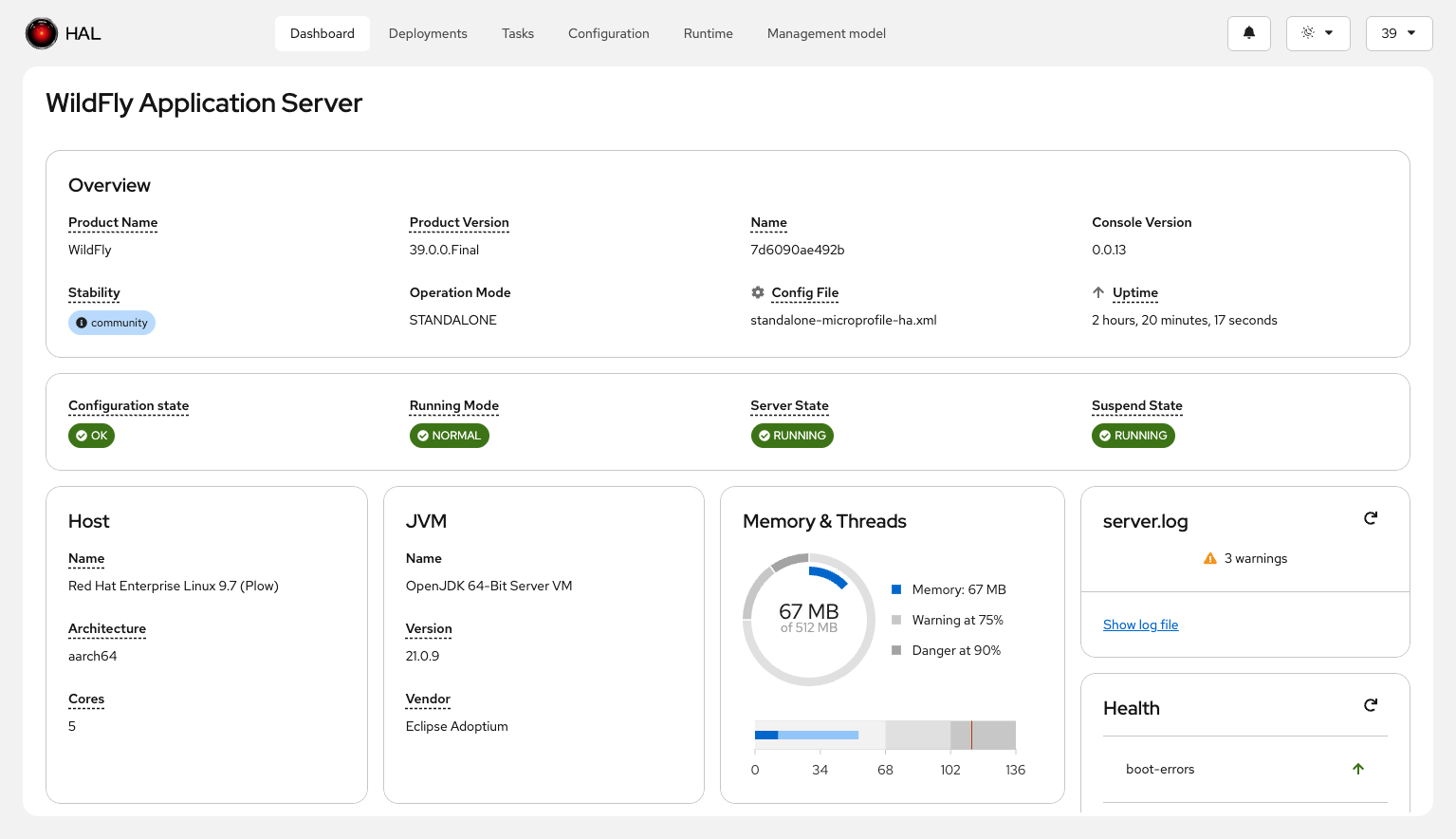
Planned improvements include refining the card set based on community feedback, card customization (pin, unpin, hide, show, reorder), real-time refresh, and card drilldown into detailed views.
Tasks
Tasks take a use-case-centric approach: instead of navigating resource by resource, they guide you through workflows that span multiple subsystems. For example, the statistics-enabled task puts all statistics toggles across datasources, messaging, and web into a single filterable view with bulk modification.
Tasks are @Dependent CDI beans discovered at build time — drop a JAR on the classpath and the tasks show up automatically. Planned tasks include SSL configuration, datasource setup, and logging configuration.
Navigation and Usability
We’re working on a "Jump to" overlay — think Ctrl+Shift+A in IntelliJ — for reaching any view or resource address via keyboard shortcut and typeahead. A bookmarking system will let you save and quickly return to frequently used places. And a "Did you know?" dialog will surface tips and lesser-known features when you open the console.
Stability Level Awareness
WildFly’s management model tags features with stability levels — default, community, preview, and experimental. The console surfaces these levels across resources, attributes, operations, and parameters, so you always know when you’re working with something that may change.
Model Graph Integration
The console will integrate with the Model Graph Tools (MGT), a Neo4j-backed knowledge base of the WildFly management model. Instead of bundling static model data, halOP will query a version-matched MGT sidecar to offer semantic search, cross-version comparison, capability and dependency exploration, and deprecation tracking. This makes the console useful not just for operations, but as a development-time tool for subsystem authors.
AI-Assisted Management
We’re exploring how AI can help users work with WildFly more effectively — understanding configuration, troubleshooting problems, and navigating the management model. PatternFly 6 ships an AI chatbot component with a conversational UI, and the management model’s rich metadata (resource descriptions, attribute constraints, capability references, stability levels) is a strong foundation for AI-assisted workflows. Combined with the Model Graph Tools integration, there’s a natural path toward context-aware assistance. The architecture for connecting these pieces — whether WildFly exposes an AI-capable endpoint, connects to an external service, or something the user configures — is still being defined.
Test Automation
End-to-end testing is handled by dave — a Playwright + TypeScript test suite that spins up isolated WildFly containers via testcontainers. Each spec file gets its own dedicated WildFly instance. Tests run in parallel across Chromium, Firefox, and WebKit using OUIA attributes for element selection, so they’re resilient to DOM and CSS changes. The page object model with Playwright fixtures keeps tests short and free of boilerplate.
Editions
halOP currently supports multiple deployment modes:
-
Bundled with WildFly — Galleon feature pack on the management interface at
http://localhost:9990/halop(requires--stability=experimental) -
Standalone (JVM) — Quarkus-powered single-page application, available from Maven Central, via JBang, or built from source
-
Standalone (Native) — GraalVM native binaries for Linux, macOS, and Windows attached to every GitHub release
-
Container — available at quay.io/halconsole/hal-op
Once finished, halOP will replace the current management console and ship by default with WildFly.
halOS will plug into the OpenShift console to manage WildFly instances on OpenShift. It shares the full foundation stack and adds an application shell for cloud-native lifecycle management. The module structure is in place but implementation hasn’t started yet.
Try It Out
Follow the steps under Deployment Modes to get started. The quickest way is via JBang:
jbang org.jboss.hal:hal-op-standalone:0.5.0:runnerWe’d love your feedback — please file issues at github.com/hal/foundation/issues.
